Sending Tokens Using ethers.js
ETHERS.JS
ERC-20
TOKENS
Beginner
Kim YongJun
April 6, 2021
3 minute read
Send Token Using ethers.js v5
In This Tutorial You'll Learn How To
- Import ethers.js
- Transfer token
- Set gas price according to the network traffic situation
To-Get-Started
To get started, we must first import the ethers.js library into our javascript Include ethers.js v5
Installing
/home/ricmoo> npm install --save ethers@5
ES6 in the Browser
<script type="module">
  import { ethers } from "https://cdn.jsdelivr.net/npm/ethers@5.7.2/dist/ethers.esm.min.js"
  // Your code here...
</script>
ES3(UMD) in the Browser
<script
  src="https://cdn.jsdelivr.net/npm/ethers@5.7.2/dist/ethers.umd.min.js"
  type="application/javascript"
></script>
Parameters
contract_address: Token contract address (contract address is needed when the token you want to transfer is not ether)send_token_amount: The amount you want to send to the receiverto_address: The receiver's addresssend_account: The sender's addressprivate_key: Private key of the sender to sign the transaction and actually transfer the tokens
Notice
signTransaction(tx) is removed because sendTransaction() does it internally.
Sending Procedures
1. Connect to network (testnet)
Set Provider (Infura)
Connect to Ropsten testnet
window.ethersProvider = new ethers.providers.InfuraProvider("ropsten")
2. Create wallet
let wallet = new ethers.Wallet(private_key)
3. Connect Wallet to net
let walletSigner = wallet.connect(window.ethersProvider)
4. Get current gas price
window.ethersProvider.getGasPrice() // gasPrice
5. Define Transaction
These variables defined below are dependent on send_token()
Transaction parameters
send_account: address of the token senderto_address: address of the token receiversend_token_amount: the amount of tokens to sendgas_limit: gas limitgas_price: gas price
const tx = {
  from: send_account,
  to: to_address,
  value: ethers.utils.parseEther(send_token_amount),
  nonce: window.ethersProvider.getTransactionCount(send_account, "latest"),
  gasLimit: ethers.utils.hexlify(gas_limit), // 100000
  gasPrice: gas_price,
}
6. Transfer
walletSigner.sendTransaction(tx).then((transaction) => {
  console.dir(transaction)
  alert("Send finished!")
})
How to use it
let private_key =
  "41559d28e936dc92104ff30691519693fc753ffbee6251a611b9aa1878f12a4d"
let send_token_amount = "1"
let to_address = "0x4c10D2734Fb76D3236E522509181CC3Ba8DE0e80"
let send_address = "0xda27a282B5B6c5229699891CfA6b900A716539E6"
let gas_limit = "0x100000"
let wallet = new ethers.Wallet(private_key)
let walletSigner = wallet.connect(window.ethersProvider)
let contract_address = ""
window.ethersProvider = new ethers.providers.InfuraProvider("ropsten")

send_token(
  contract_address,
  send_token_amount,
  to_address,
  send_address,
  private_key
)
Success!
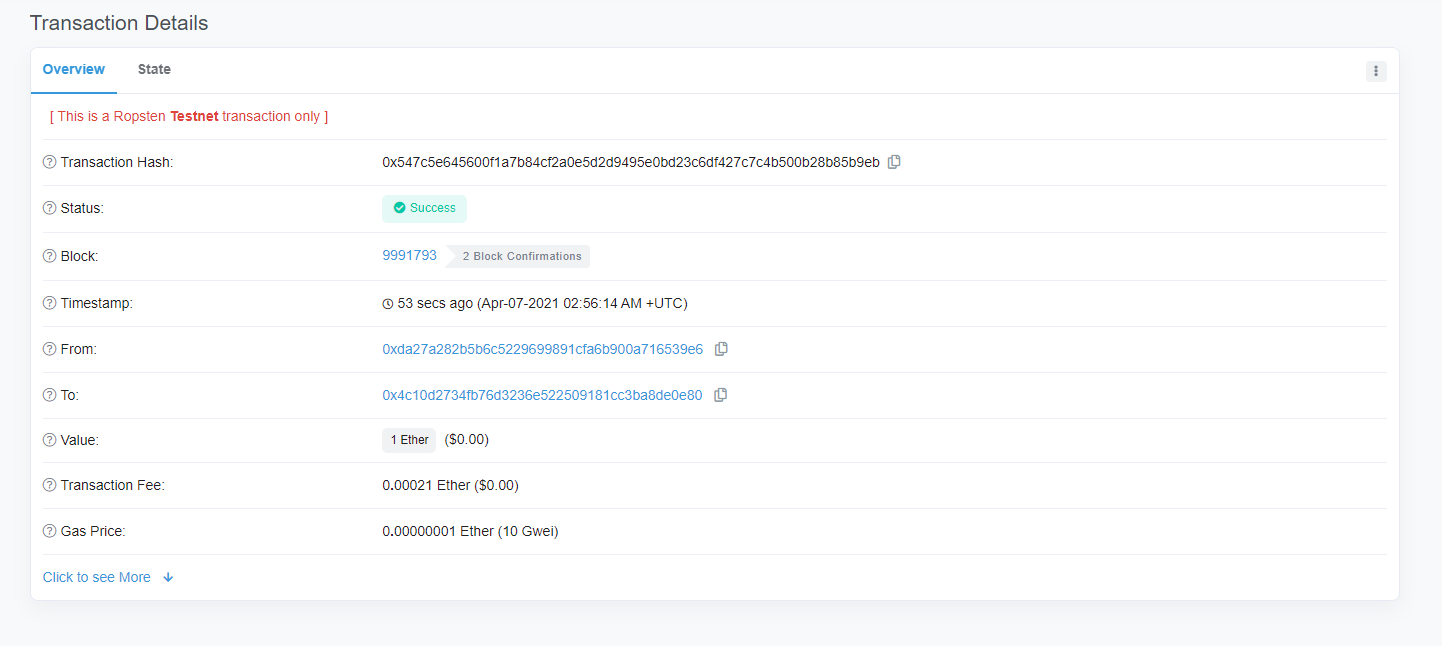
send_token()
function send_token(
  contract_address,
  send_token_amount,
  to_address,
  send_account,
  private_key
) {
  let wallet = new ethers.Wallet(private_key)
  let walletSigner = wallet.connect(window.ethersProvider)

  window.ethersProvider.getGasPrice().then((currentGasPrice) => {
    let gas_price = ethers.utils.hexlify(parseInt(currentGasPrice))
    console.log(`gas_price: ${gas_price}`)

    if (contract_address) {
      // general token send
      let contract = new ethers.Contract(
        contract_address,
        send_abi,
        walletSigner
      )

      // How many tokens?
      let numberOfTokens = ethers.utils.parseUnits(send_token_amount, 18)
      console.log(`numberOfTokens: ${numberOfTokens}`)

      // Send tokens
      contract.transfer(to_address, numberOfTokens).then((transferResult) => {
        console.dir(transferResult)
        alert("sent token")
      })
    } // ether send
    else {
      const tx = {
        from: send_account,
        to: to_address,
        value: ethers.utils.parseEther(send_token_amount),
        nonce: window.ethersProvider.getTransactionCount(
          send_account,
          "latest"
        ),
        gasLimit: ethers.utils.hexlify(gas_limit), // 100000
        gasPrice: gas_price,
      }
      console.dir(tx)
      try {
        walletSigner.sendTransaction(tx).then((transaction) => {
          console.dir(transaction)
          alert("Send finished!")
        })
      } catch (error) {
        alert("failed to send!!")
      }
    }
  })
}