Learn Foundational Ethereum Topics with SQL
Many Ethereum tutorials target developers, but there’s a lack of educational resources for data analysts or for people who wish to see onchain data without running a client or node.
This tutorial helps readers understand fundamental Ethereum concepts including transactions, blocks and gas by querying onchain data with structured query language (SQL) through an interface provided by Dune (opens in a new tab). The queries use DuneSQL (opens in a new tab), Dune's SQL dialect.
Onchain data can help us understand Ethereum, the network, and as an economy for computing power and should serve as a base for understanding challenges facing Ethereum today (i.e., rising gas prices) and, more importantly, discussions around scaling solutions.
Transactions
A user’s journey on Ethereum starts with initializing a user-controlled account or an entity with an ETH balance. There are two account types - user-controlled or a smart contract (see ethereum.org).
Any account can be viewed on a block explorer like Etherscan (opens in a new tab) or Blockscout (opens in a new tab). Block explorers are a portal to Ethereum's data. They display, in real-time, data on blocks, transactions, validators, accounts and other onchain activity (see here).
However, a user may wish to query the data directly to reconcile the information provided by external block explorers. Dune (opens in a new tab) provides this capability to anyone with some knowledge of SQL.
For reference, the smart contract account for the Ethereum Foundation (EF) can be viewed on Blockscout (opens in a new tab).
One thing to note is that all accounts, including the EF’s, have a public address that can be used to send and receive transactions.
The account balance on Etherscan comprises regular transactions and internal transactions. Internal transactions, despite the name, are not actual transactions that change the state of the chain. They are value transfers initiated by executing a contract (source (opens in a new tab)). Since internal transactions have no signature, they are not included on the blockchain as transactions. Dune records them separately, in the ethereum.traces table.
Therefore, this tutorial will focus on regular transactions. This can be queried as such:
WITH temp_table AS (
SELECT
    hash,
    block_number,
    block_time,
    "from",
    "to",
    value / 1e18 AS ether,
    gas_used,
    gas_price / 1e9 AS gas_price_gwei
FROM ethereum.transactions
WHERE "to" = 0xde0B295669a9FD93d5F28D9Ec85E40f4cb697BAe
ORDER BY block_time DESC
)
SELECT
    hash,
    block_number,
    block_time,
    "from",
    "to",
    ether,
    (gas_used * gas_price_gwei) / 1e9 AS txn_fee
FROM temp_table
Note that addresses are written as 0x... literals without quotes. In DuneSQL, addresses and hashes are binary values, not strings.
This will yield the same information as provided on Etherscan's transaction page. For comparison, here are the two sources:
Etherscan
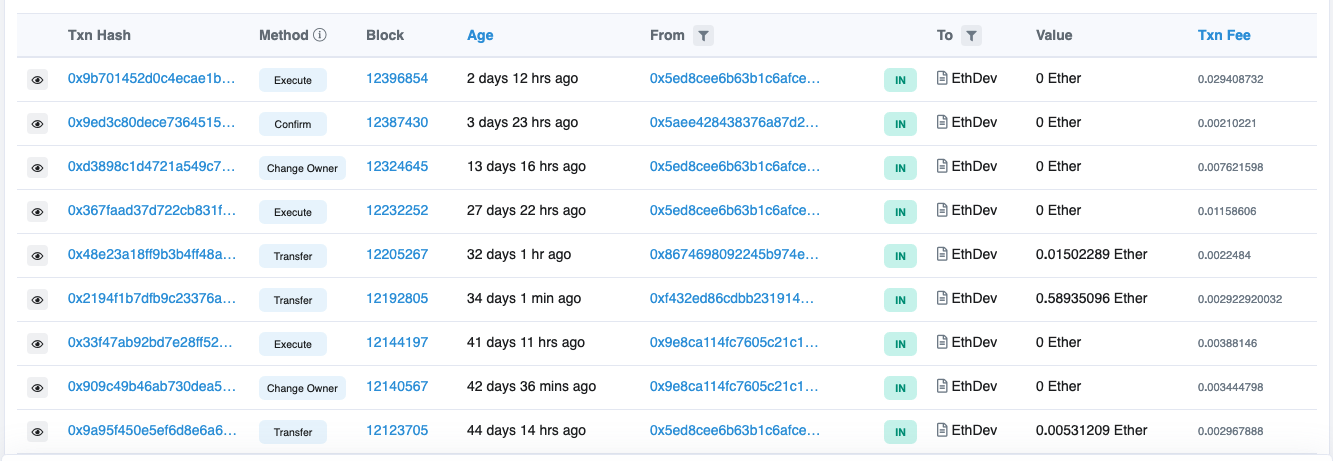
EF's contract page on Blockscout. (opens in a new tab)
Dune
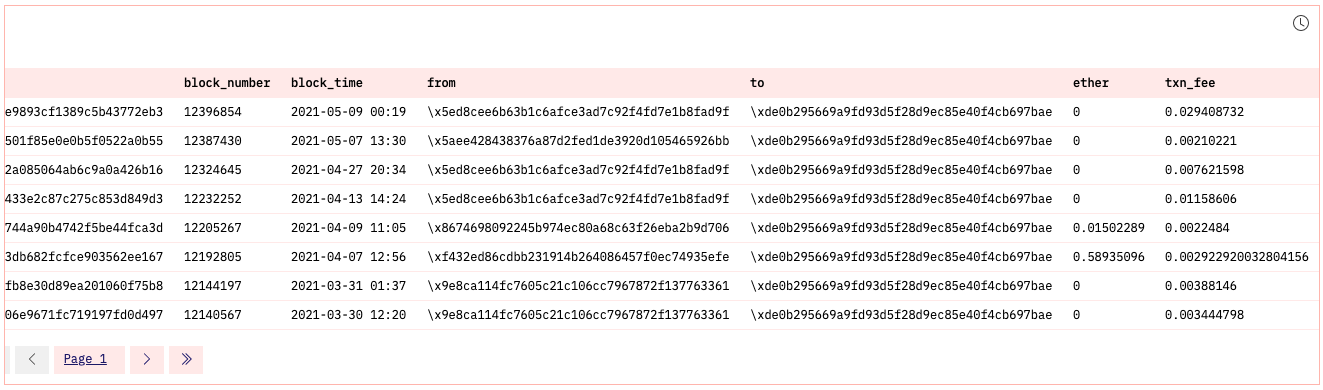
You can find dashboard here (opens in a new tab). Click on the table to see the query (also see above).
Breaking Down Transactions
A submitted transaction includes several pieces of information including (source):
- Recipient: The receiving address (queried as "to")
- Signature: While a sender's private keys signs a transaction, what we can query with SQL is a sender's public address ("from").
- Value: This is the amount of ETH transferred (see
ethercolumn). - Data: This is arbitrary data that's been hashed (see
datacolumn) - gasLimit – the maximum amount of gas units that can be consumed by the transaction. Units of gas represent computational steps
- maxPriorityFeePerGas - the maximum amount of gas to be included as a tip to the validator
- maxFeePerGas - the maximum amount of gas willing to be paid for the transaction (inclusive of baseFeePerGas and maxPriorityFeePerGas)
We can query these specific pieces of information for transactions to the Ethereum Foundation public address:
SELECT
    "to",
    "from",
    value / 1e18 AS ether,
    data,
    gas_limit,
    gas_price / 1e9 AS gas_price_gwei,
    gas_used,
    ROUND(CAST(gas_used AS DOUBLE) / gas_limit * 100, 2) AS gas_used_pct
FROM ethereum.transactions
WHERE "to" = 0xde0B295669a9FD93d5F28D9Ec85E40f4cb697BAe
ORDER BY block_time DESC
The CAST is necessary because dividing one integer by another in DuneSQL gives an integer result, which would round almost every percentage down to zero.
Blocks
Each transaction will change the state of the Ethereum virtual machine (EVM) (source). Transactions are broadcasted to the network to be verified and included in a block. Each transaction is associated with a block number. To see the data, we could query a specific block number: 12396854 (the most recent block among Ethereum Foundation transactions at the time of writing, in May 2021).
Moreover, when we query the next two blocks, we can see that each block contains the hash of the previous block (i.e., parent hash), illustrating how the blockchain is formed.
Each block contains a reference to it parent block. This is shown below between the hash and parent_hash columns (source):
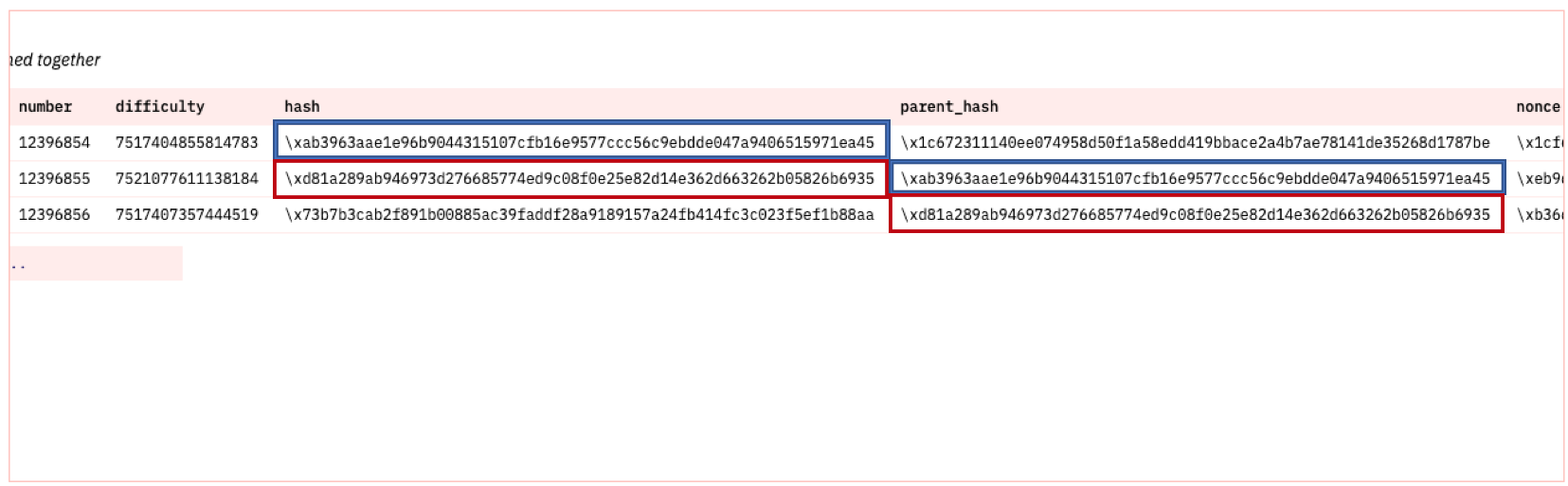
Here is the query:
SELECT
   time,
   number,
   hash,
   parent_hash,
   nonce
FROM ethereum.blocks
WHERE number IN (12396854, 12396855, 12396856)
We can examine a block by querying time, block number, hash, parent hash, and nonce. Block 12396854 was produced before the Merge, when blocks were mined with proof-of-work and the nonce was meaningful. In proof-of-stake blocks the nonce is always zero.
The only thing this query does not cover is list of transaction which requires a separate query below and state root. A full or archival node will store all transactions and state transitions, allowing for clients to query the state of the chain at any time. Because this requires large storage space, we can separate chain data from state data:
- Chain data (list of blocks, transactions)
- State data (result of each transaction’s state transition)
State root falls in the latter and is implicit data (not stored onchain), while chain data is explicit and stored on the chain itself (source (opens in a new tab)).
For this tutorial, we'll be focusing on onchain data that can be queried with SQL via Dune.
As stated above, each block contains a list of transactions, we can query this by filtering for a specific block. We'll try block 12396854:
SELECT * FROM ethereum.transactions
WHERE block_number = 12396854
Here's the SQL output on Dune:
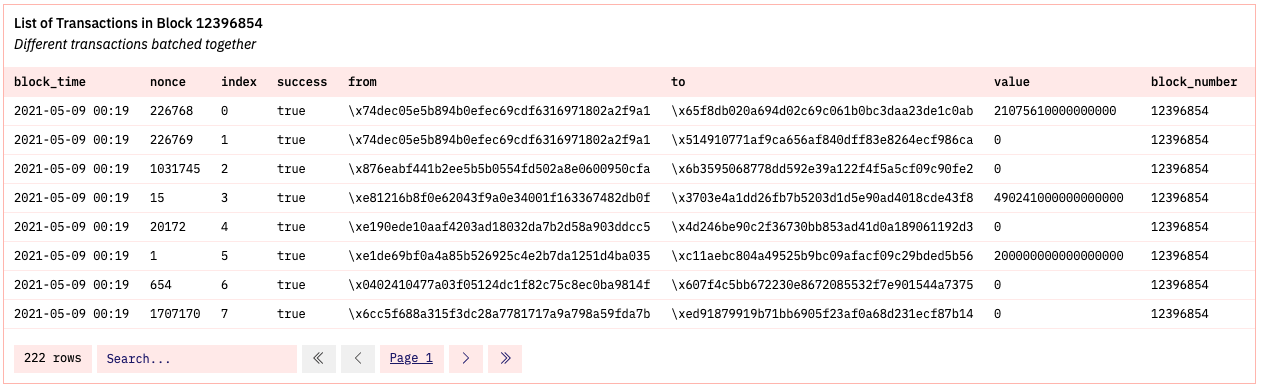
This single block being added to the chain changes the state of the Ethereum virtual machine (EVM). Dozens sometimes, hundreds of transactions are verified at once. In this specific case, 222 transactions were included.
To see how many were actually successful, we would add another filter to count successful transactions:
SELECT
    COUNT(*) AS num_successful_txn
FROM ethereum.transactions
WHERE block_number = 12396854 AND success = true
For block 12396854, out of 222 total transactions, 204 were successfully verified:

Transaction requests occur dozens of times per second, but blocks are only added periodically (source). Under proof-of-work, a block was mined on average every 13 to 15 seconds, with a lot of variation. Since the Merge in September 2022, proof-of-stake divides time into 12 second slots, and each slot can have at most one block.
So today there can be at most 86400 / 12 = 7200 blocks per day. In practice there are slightly fewer, because a validator occasionally misses its slot.
The chart for Ethereum blocks produced per day (2016 - 2021) is:
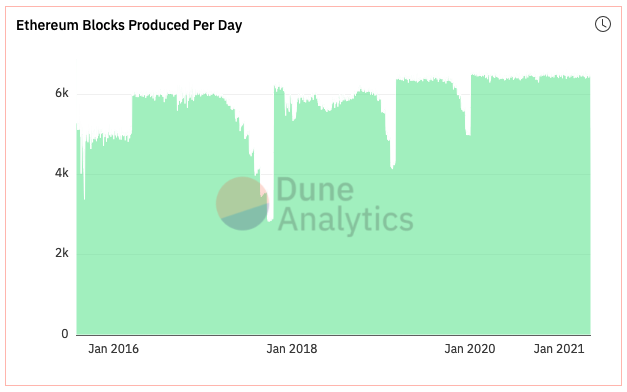
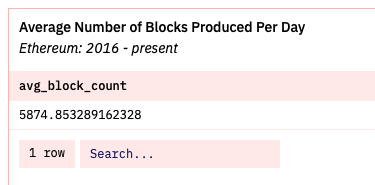
The average number of blocks produced daily over this time period is ~5,874:
The queries are:
Here is the query to visualize the number of blocks produced daily. The WHERE clause excludes the current day, which is not finished yet.
SELECT
    DATE_TRUNC('day', time) AS dt,
    COUNT(*) AS block_count
FROM ethereum.blocks
WHERE time < DATE_TRUNC('day', NOW())
GROUP BY 1
ORDER BY 1
And this query calculates the average number of blocks produced per day, before and after the Merge. Block 15537394 is the first proof-of-stake block.
WITH daily AS (
    SELECT
        DATE_TRUNC('day', time) AS dt,
        MIN(number) >= 15537394 AS after_merge,
        COUNT(*) AS block_count
    FROM ethereum.blocks
    WHERE time < DATE_TRUNC('day', NOW())
    GROUP BY 1
)
SELECT
    after_merge,
    AVG(block_count) AS avg_block_count,
    86400 / AVG(block_count) AS avg_seconds_per_block
FROM daily
GROUP BY 1
When this tutorial was first written in May 2021, the average was 5,874 blocks per day, or one block every 14.7 seconds. After the Merge, the average is just under the 7200 maximum, about one block every 12 seconds.
Gas
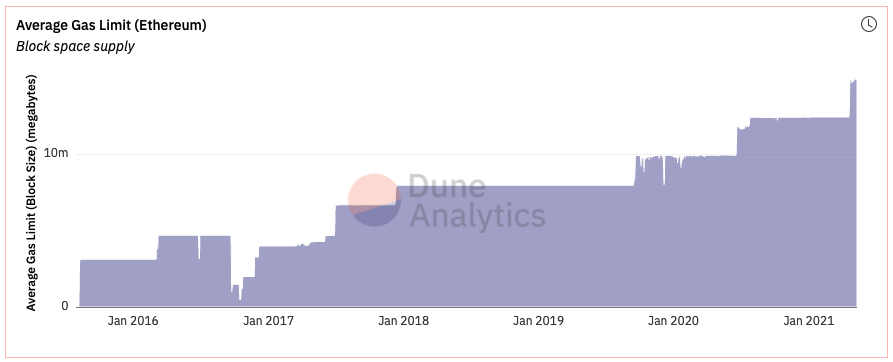
Blocks are bounded in size. Each block has a gas limit, and since EIP-1559 each block also has a gas target, which is half of the limit. When blocks use more gas than the target, the base fee goes up, and when they use less, it goes down. The gas limit itself is adjusted by validators, and it has been raised several times over the years. Limits are required to prevent arbitrarily large block sizes putting strain on full nodes in terms of disk space and speed requirements (source).
One way to conceptualize block gas limit is to think of it as the supply of available block space in which to batch transactions. The block gas limit can be queried and visualized from 2016 to present day:
SELECT
    DATE_TRUNC('day', time) AS dt,
    AVG(gas_limit) AS avg_block_gas_limit
FROM ethereum.blocks
WHERE time < DATE_TRUNC('day', NOW())
GROUP BY 1
ORDER BY 1
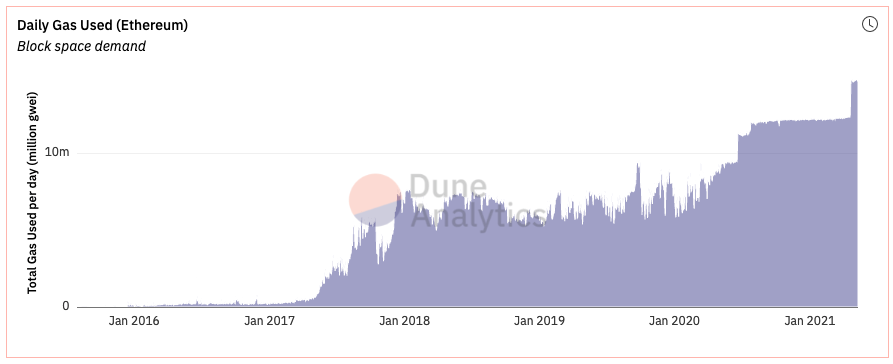
Then there is the actual gas used daily to pay for computing done on the Ethereum chain (i.e., sending transaction, calling a smart contract, minting an NFT). This is the demand for available Ethereum block space:
SELECT
    DATE_TRUNC('day', time) AS dt,
    AVG(gas_used) AS avg_block_gas_used
FROM ethereum.blocks
WHERE time < DATE_TRUNC('day', NOW())
GROUP BY 1
ORDER BY 1
We can also juxtapose these two charts together to see how demand and supply line up:
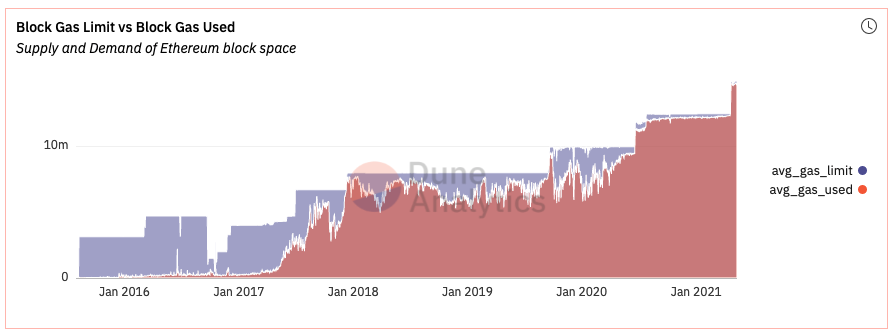
Therefore we can understand gas prices as a function of demand for Ethereum block space, given available supply.
Finally, we may want to query average daily gas prices for the Ethereum chain, however, doing so will result in an especially long query time, so we’ll filter our query to the average amount of gas paid per transaction by the Ethereum Foundation.
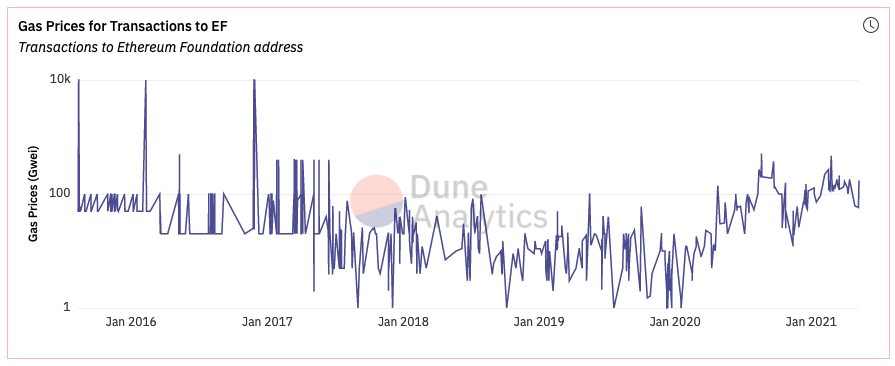
We can see gas prices paid for all transactions made to the Ethereum Foundation address over the years. Here is the query:
SELECT
    block_time,
    gas_price / 1e9 AS gas_price_gwei,
    value / 1e18 AS eth_sent
FROM ethereum.transactions
WHERE "to" = 0xde0B295669a9FD93d5F28D9Ec85E40f4cb697BAe
ORDER BY block_time DESC
Summary
With this tutorial, we understand foundational Ethereum concepts and how the Ethereum blockchain works by querying and getting a feel for onchain data.
The dashboard that holds all code used in this tutorial can be found here (opens in a new tab).
For more use of data to explore web3 find me on Twitter (opens in a new tab).