ethers.js ఉపయోగించి టోకెన్లను పంపడం
ETHERS.JS
ERC-20
టోకెన్లు
ప్రారంభ
Kim YongJun
6 ఏప్రిల్, 2021
2 నిమిషం పఠనం
ethers.js(5.0) ఉపయోగించి టోకెన్ను పంపండి
ఈ ట్యుటోరియల్లో మీరు ఎలాగో నేర్చుకుంటారు
- ethers.js ను దిగుమతి చేయండి
- టోకెన్ బదిలీ
- నెట్వర్క్ ట్రాఫిక్ పరిస్థితి ప్రకారం గ్యాస్ ధరను సెట్ చేయండి
ప్రారంభించడానికి
ప్రారంభించడానికి, మనము మొదట మన జావాస్క్రిప్ట్లో ethers.js లైబ్రరీని దిగుమతి చేసుకోవాలి ethers.js(5.0)ను చేర్చండి
ఇన్స్టాల్ చేస్తోంది
1/home/ricmoo> npm install --save ethersబ్రౌజర్లో ES6
1<script type="module">2 import { ethers } from "https://cdn.ethers.io/lib/ethers-5.0.esm.min.js"3 // Your code here...4</script>బ్రౌజర్లో ES3(UMD)
1<script2 src="https://cdn.ethers.io/lib/ethers-5.0.umd.min.js"3 type="application/javascript"4></script>పరామితులు
contract_address: టోకెన్ కాంట్రాక్టు చిరునామా (మీరు బదిలీ చేయాలనుకుంటున్న టోకెన్ ఈథర్ కానప్పుడు కాంట్రాక్టు చిరునామా అవసరం)send_token_amount: మీరు రిసీవర్కు పంపాలనుకుంటున్న మొత్తంto_address: రిసీవర్ చిరునామాsend_account: పంపినవారి చిరునామాprivate_key: లావాదేవీపై సంతకం చేయడానికి మరియు వాస్తవానికి టోకెన్లను బదిలీ చేయడానికి పంపినవారి ప్రైవేట్ కీ
గమనిక
signTransaction(tx) తీసివేయబడింది ఎందుకంటే sendTransaction() దానిని అంతర్గతంగా చేస్తుంది.
పంపే విధానాలు
1. నెట్వర్క్కు కనెక్ట్ అవ్వండి (టెస్టునెట్)
ప్రొవైడర్ను సెట్ చేయండి (Infura)
Ropsten టెస్టునెట్కు కనెక్ట్ అవ్వండి
1window.ethersProvider = new ethers.providers.InfuraProvider("ropsten")2. వాలెట్ను సృష్టించండి
1let wallet = new ethers.Wallet(private_key)3. వాలెట్ను నెట్కు కనెక్ట్ చేయండి
1let walletSigner = wallet.connect(window.ethersProvider)4. ప్రస్తుత గ్యాస్ ధరను పొందండి
1window.ethersProvider.getGasPrice() // gasPrice5. లావాదేవీని నిర్వచించండి
క్రింద నిర్వచించబడిన ఈ వేరియబుల్స్ send_token() పై ఆధారపడి ఉంటాయి
లావాదేవీ పరామితులు
send_account: టోకెన్ పంపినవారి చిరునామాto_address: టోకెన్ రిసీవర్ చిరునామాsend_token_amount: పంపాల్సిన టోకెన్ల మొత్తంgas_limit: గ్యాస్ పరిమితిgas_price: గ్యాస్ ధర
1const tx = {2 from: send_account,3 to: to_address,4 value: ethers.utils.parseEther(send_token_amount),5 nonce: window.ethersProvider.getTransactionCount(send_account, "latest"),6 gasLimit: ethers.utils.hexlify(gas_limit), // 1000007 gasPrice: gas_price,8}6. బదిలీ
1walletSigner.sendTransaction(tx).then((transaction) => {2 console.dir(transaction)3 alert("Send finished!")4})దీన్ని ఎలా ఉపయోగించాలి
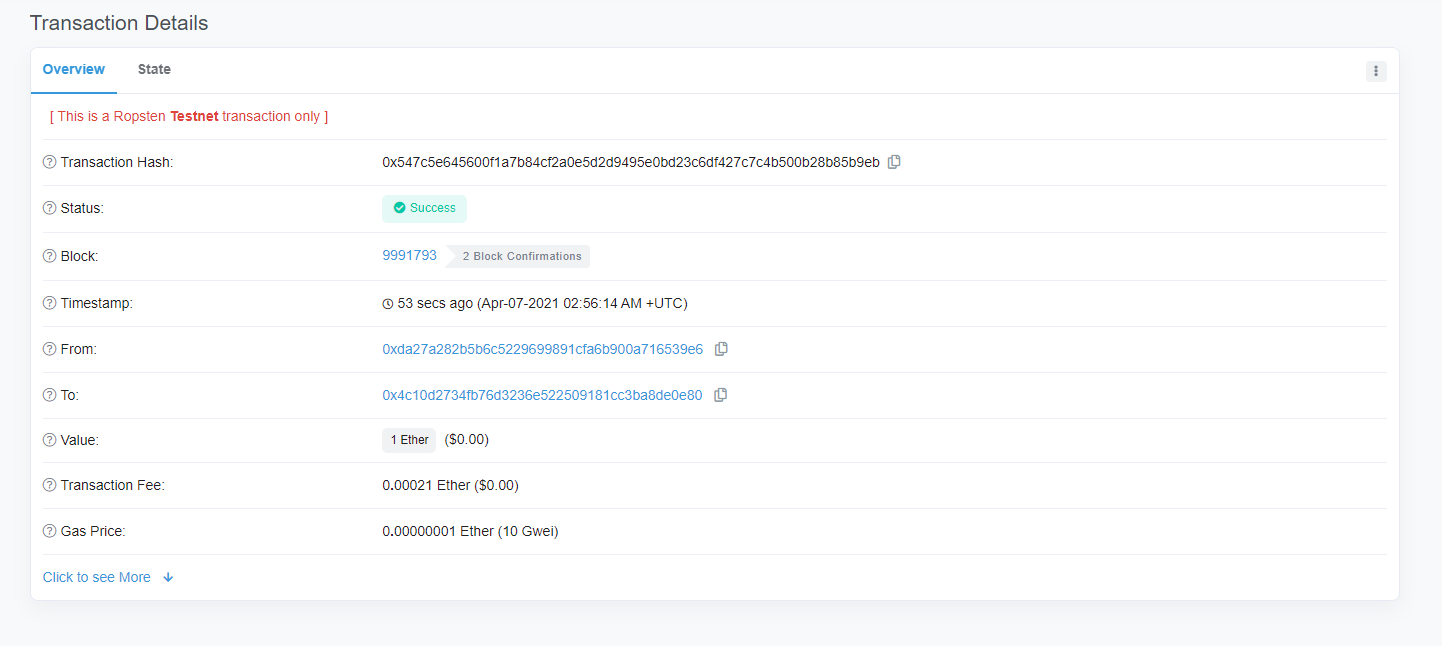
1let private_key =2 "41559d28e936dc92104ff30691519693fc753ffbee6251a611b9aa1878f12a4d"3let send_token_amount = "1"4let to_address = "0x4c10D2734Fb76D3236E522509181CC3Ba8DE0e80"5let send_address = "0xda27a282B5B6c5229699891CfA6b900A716539E6"6let gas_limit = "0x100000"7let wallet = new ethers.Wallet(private_key)8let walletSigner = wallet.connect(window.ethersProvider)9let contract_address = ""10window.ethersProvider = new ethers.providers.InfuraProvider("ropsten")11
12send_token(13 contract_address,14 send_token_amount,15 to_address,16 send_address,17 private_key18)విజయం!
send_token()
1function send_token(2 contract_address,3 send_token_amount,4 to_address,5 send_account,6 private_key7) {8 let wallet = new ethers.Wallet(private_key)9 let walletSigner = wallet.connect(window.ethersProvider)10
11 window.ethersProvider.getGasPrice().then((currentGasPrice) => {12 let gas_price = ethers.utils.hexlify(parseInt(currentGasPrice))13 console.log(`gas_price: ${gas_price}`)14
15 if (contract_address) {16 // general token send17 let contract = new ethers.Contract(18 contract_address,19 send_abi,20 walletSigner21 )22
23 // How many tokens?24 let numberOfTokens = ethers.utils.parseUnits(send_token_amount, 18)25 console.log(`numberOfTokens: ${numberOfTokens}`)26
27 // Send tokens28 contract.transfer(to_address, numberOfTokens).then((transferResult) => {29 console.dir(transferResult)30 alert("sent token")31 })32 } // ether send33 else {34 const tx = {35 from: send_account,36 to: to_address,37 value: ethers.utils.parseEther(send_token_amount),38 nonce: window.ethersProvider.getTransactionCount(39 send_account,40 "latest"41 ),42 gasLimit: ethers.utils.hexlify(gas_limit), // 10000043 gasPrice: gas_price,44 }45 console.dir(tx)46 try {47 walletSigner.sendTransaction(tx).then((transaction) => {48 console.dir(transaction)49 alert("Send finished!")50 })51 } catch (error) {52 alert("failed to send!!")53 }54 }55 })56}పేజీ చివరి అప్డేట్: 3 మార్చి, 2026