ethers.jsを使用したトークンの送金
ETHERS.JS
ERC-20
トークン
初級
キム・ヨンジュン
2021年4月6日
3 分で読めます
ethers.js v5を使用したトークンの送金
このチュートリアルで学べること
- ethers.jsのインポート
- トークンの送金
- ネットワークのトラフィック状況に応じたガス価格の設定
はじめに
はじめるにあたり、まずethers.jsライブラリをJavaScriptにインポートする必要があります。 ethers.js v5のインクルード
インストール
/home/ricmoo> npm install --save ethers@5
ブラウザでのES6
<script type="module">
  import { ethers } from "https://cdn.jsdelivr.net/npm/ethers@5.7.2/dist/ethers.esm.min.js"
  // ここにコードを記述してください...
</script>
ブラウザでのES3(UMD)
<script
  src="https://cdn.jsdelivr.net/npm/ethers@5.7.2/dist/ethers.umd.min.js"
  type="application/javascript"
></script>
パラメータ
contract_address: トークンのコントラクトアドレス(送金したいトークンがイーサではない場合、コントラクトアドレスが必要です)send_token_amount: 受信者に送金したい金額to_address: 受信者のアドレスsend_account: 送信者のアドレスprivate_key: トランザクションに署名し、実際にトークンを送金するための送信者の秘密鍵
注意
sendTransaction()が内部で処理するため、signTransaction(tx)は削除されています。
送金手順
1. ネットワーク(テストネット)への接続
プロバイダーの設定(Infura)
ロプステンのテストネットに接続します
window.ethersProvider = new ethers.providers.InfuraProvider("ropsten")
2. ウォレットの作成
let wallet = new ethers.Wallet(private_key)
3. ウォレットをネットワークに接続
let walletSigner = wallet.connect(window.ethersProvider)
4. 現在のガス価格の取得
window.ethersProvider.getGasPrice() // ガス価格
5. トランザクションの定義
以下で定義されているこれらの変数は、send_token()に依存しています。
トランザクションのパラメータ
send_account: トークン送信者のアドレスto_address: トークン受信者のアドレスsend_token_amount: 送金するトークンの量gas_limit: ガス・リミットgas_price: ガス価格
const tx = {
  from: send_account,
  to: to_address,
  value: ethers.utils.parseEther(send_token_amount),
  nonce: window.ethersProvider.getTransactionCount(send_account, "latest"),
  gasLimit: ethers.utils.hexlify(gas_limit), // 100000
  gasPrice: gas_price,
}
6. 送金
walletSigner.sendTransaction(tx).then((transaction) => {
  console.dir(transaction)
  alert("Send finished!")
})
使用方法
let private_key =
  "41559d28e936dc92104ff30691519693fc753ffbee6251a611b9aa1878f12a4d"
let send_token_amount = "1"
let to_address = "0x4c10D2734Fb76D3236E522509181CC3Ba8DE0e80"
let send_address = "0xda27a282B5B6c5229699891CfA6b900A716539E6"
let gas_limit = "0x100000"
let wallet = new ethers.Wallet(private_key)
let walletSigner = wallet.connect(window.ethersProvider)
let contract_address = ""
window.ethersProvider = new ethers.providers.InfuraProvider("ropsten")

send_token(
  contract_address,
  send_token_amount,
  to_address,
  send_address,
  private_key
)
成功!
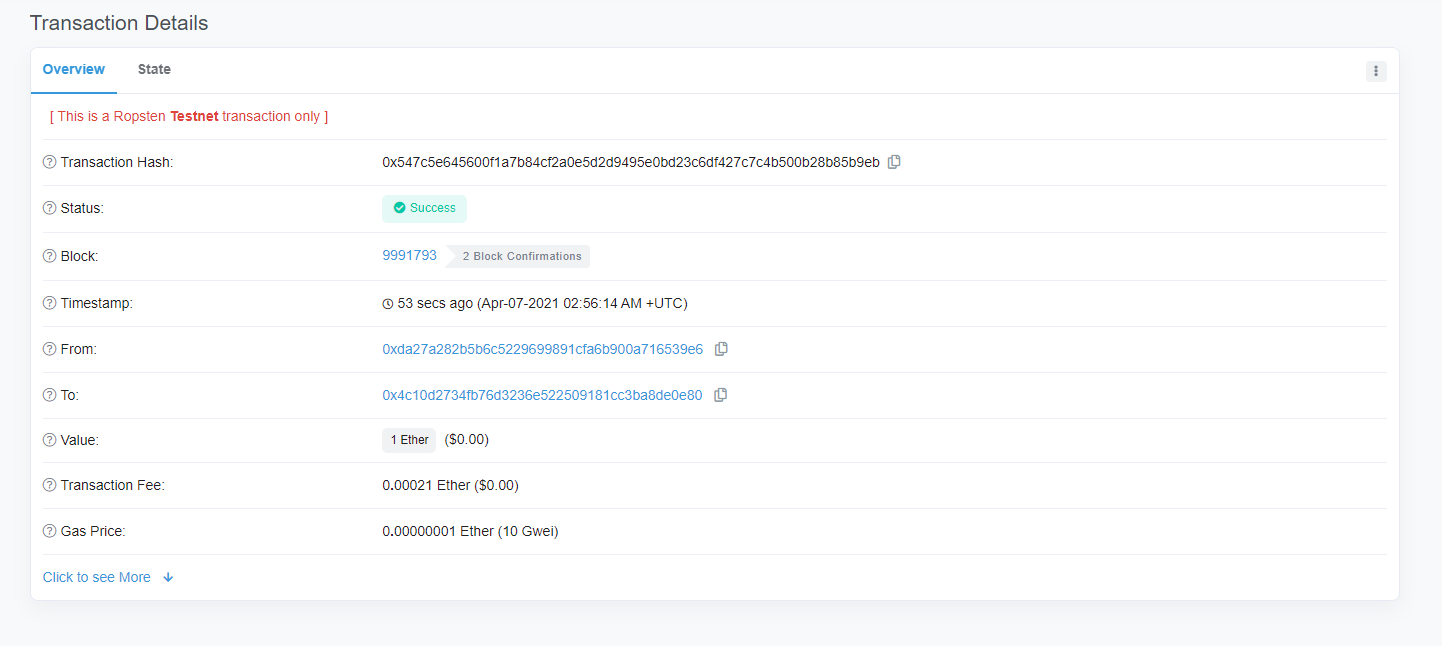
send_token()
function send_token(
  contract_address,
  send_token_amount,
  to_address,
  send_account,
  private_key
) {
  let wallet = new ethers.Wallet(private_key)
  let walletSigner = wallet.connect(window.ethersProvider)

  window.ethersProvider.getGasPrice().then((currentGasPrice) => {
    let gas_price = ethers.utils.hexlify(parseInt(currentGasPrice))
    console.log(`gas_price: ${gas_price}`)

    if (contract_address) {
      // 一般的なトークンの送信
      let contract = new ethers.Contract(
        contract_address,
        send_abi,
        walletSigner
      )

      // トークンの数は?
      let numberOfTokens = ethers.utils.parseUnits(send_token_amount, 18)
      console.log(`numberOfTokens: ${numberOfTokens}`)

      // トークンを送信
      contract.transfer(to_address, numberOfTokens).then((transferResult) => {
        console.dir(transferResult)
        alert("sent token")
      })
    } // イーサの送信
    else {
      const tx = {
        from: send_account,
        to: to_address,
        value: ethers.utils.parseEther(send_token_amount),
        nonce: window.ethersProvider.getTransactionCount(
          send_account,
          "latest"
        ),
        gasLimit: ethers.utils.hexlify(gas_limit), // 100000
        gasPrice: gas_price,
      }
      console.dir(tx)
      try {
        walletSigner.sendTransaction(tx).then((transaction) => {
          console.dir(transaction)
          alert("Send finished!")
        })
      } catch (error) {
        alert("failed to send!!")
      }
    }
  })
}