Gửi token bằng ethers.js
ETHERS.JS
ERC-20
TOKEN
Người mới bắt đầu
Kim YongJun
6 tháng 4, 2021
3 phút đọc
Gửi token bằng ethers.js(5.0)
Trong hướng dẫn này, bạn sẽ học cách
- Nhập ethers.js
- Chuyển token
- Đặt giá gas theo tình trạng lưu lượng mạng lưới
Để bắt đầu
Để bắt đầu, trước tiên chúng ta phải nhập thư viện ethers.js vào JavaScript của mình Thêm ethers.js v5
Cài đặt
/home/ricmoo> npm install --save ethers
ES6 trong Trình duyệt
<script type="module">
  import { ethers } from "https://cdn.ethers.io/lib/ethers-5.0.esm.min.js"
  // Mã của bạn ở đây...
</script>
ES3(UMD) trong Trình duyệt
<script
  src="https://cdn.ethers.io/lib/ethers-5.0.umd.min.js"
  type="application/javascript"
></script>
Các tham số
contract_address: Địa chỉ hợp đồng token (cần có địa chỉ hợp đồng khi token bạn muốn chuyển không phải là ether)send_token_amount: Số lượng bạn muốn gửi cho người nhậnto_address: Địa chỉ của người nhậnsend_account: Địa chỉ của người gửiprivate_key: Khóa riêng tư của người gửi để ký giao dịch và thực sự chuyển token
Lưu ý
signTransaction(tx) bị loại bỏ vì sendTransaction() thực hiện việc đó ở bên trong.
Quy trình gửi
1. Kết nối với mạng lưới (mạng thử nghiệm)
Thiết lập Provider (Infura)
Kết nối với mạng thử nghiệm Ropsten
window.ethersProvider = new ethers.providers.InfuraProvider("ropsten")
2. Tạo ví
let wallet = new ethers.Wallet(private_key)
3. Kết nối ví với mạng lưới
let walletSigner = wallet.connect(window.ethersProvider)
4. Lấy giá gas hiện tại
window.ethersProvider.getGasPrice() // giá gas
5. Định nghĩa giao dịch
Các biến được định nghĩa dưới đây phụ thuộc vào send_token()
Các tham số giao dịch
send_account: địa chỉ của người gửi tokento_address: địa chỉ của người nhận tokensend_token_amount: số lượng token cần gửigas_limit: giới hạn gasgas_price: giá gas
Xem bên dưới để biết cách sử dụng
const tx = {
  from: send_account,
  to: to_address,
  value: ethers.utils.parseEther(send_token_amount),
  nonce: window.ethersProvider.getTransactionCount(send_account, "latest"),
  gasLimit: ethers.utils.hexlify(gas_limit), // 100000
  gasPrice: gas_price,
}
6. Chuyển
walletSigner.sendTransaction(tx).then((transaction) => {
  console.dir(transaction)
  alert("Send finished!")
})
Cách sử dụng
let private_key =
  "41559d28e936dc92104ff30691519693fc753ffbee6251a611b9aa1878f12a4d"
let send_token_amount = "1"
let to_address = "0x4c10D2734Fb76D3236E522509181CC3Ba8DE0e80"
let send_address = "0xda27a282B5B6c5229699891CfA6b900A716539E6"
let gas_limit = "0x100000"
let wallet = new ethers.Wallet(private_key)
let walletSigner = wallet.connect(window.ethersProvider)
let contract_address = ""
window.ethersProvider = new ethers.providers.InfuraProvider("ropsten")

send_token(
  contract_address,
  send_token_amount,
  to_address,
  send_address,
  private_key
)
Thành công!
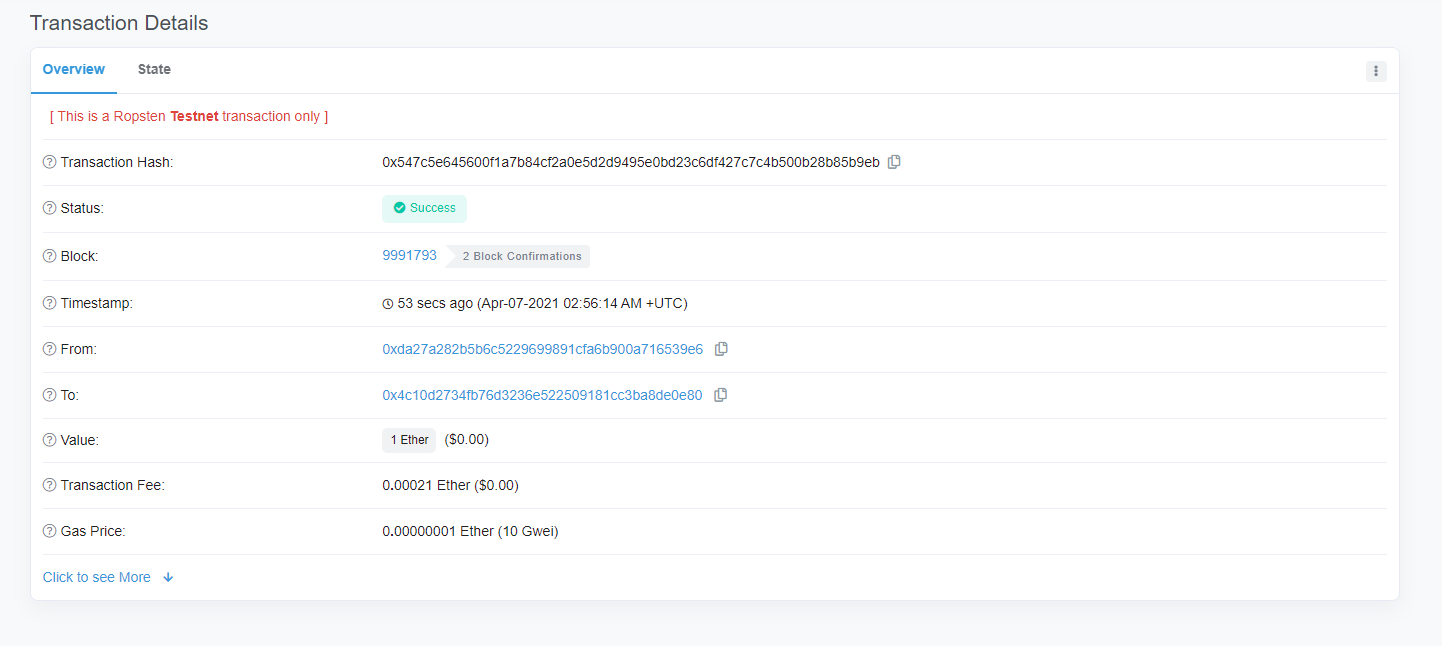
send_token()
function send_token(
  contract_address,
  send_token_amount,
  to_address,
  send_account,
  private_key
) {
  let wallet = new ethers.Wallet(private_key)
  let walletSigner = wallet.connect(window.ethersProvider)

  window.ethersProvider.getGasPrice().then((currentGasPrice) => {
    let gas_price = ethers.utils.hexlify(parseInt(currentGasPrice))
    console.log(`gas_price: ${gas_price}`)

    if (contract_address) {
      // gửi token thông thường
      let contract = new ethers.Contract(
        contract_address,
        send_abi,
        walletSigner
      )

      // Bao nhiêu token?
      let numberOfTokens = ethers.utils.parseUnits(send_token_amount, 18)
      console.log(`numberOfTokens: ${numberOfTokens}`)

      // Gửi token
      contract.transfer(to_address, numberOfTokens).then((transferResult) => {
        console.dir(transferResult)
        alert("sent token")
      })
    } // gửi ether
    else {
      const tx = {
        from: send_account,
        to: to_address,
        value: ethers.utils.parseEther(send_token_amount),
        nonce: window.ethersProvider.getTransactionCount(
          send_account,
          "latest"
        ),
        gasLimit: ethers.utils.hexlify(gas_limit), // 100000
        gasPrice: gas_price,
      }
      console.dir(tx)
      try {
        walletSigner.sendTransaction(tx).then((transaction) => {
          console.dir(transaction)
          alert("Send finished!")
        })
      } catch (error) {
        alert("failed to send!!")
      }
    }
  })
}