Solidity मधून इतर कॉन्ट्रॅक्ट्सशी संवाद साधा
मागील ट्यूटोरियल्समध्ये आपण तुमचे पहिले स्मार्ट कॉन्ट्रॅक्ट कसे प्रस्थापित करावे आणि त्यात मॉडिफायर्ससह प्रवेश नियंत्रित करणे (नवीन टॅबमध्ये उघडते) किंवा Solidity मध्ये त्रुटी हाताळणे (नवीन टॅबमध्ये उघडते) यासारखी काही वैशिष्ट्ये कशी जोडावीत याबद्दल बरेच काही शिकलो. या ट्यूटोरियलमध्ये आपण विद्यमान कॉन्ट्रॅक्टमधून स्मार्ट कॉन्ट्रॅक्ट कसे प्रस्थापित करावे आणि त्याच्याशी संवाद कसा साधावा हे शिकू.
आपण एक असे कॉन्ट्रॅक्ट बनवू जे कोणालाही स्वतःचे Counter स्मार्ट कॉन्ट्रॅक्ट मिळवण्यास सक्षम करेल, त्यासाठी एक फॅक्टरी तयार करून, त्याचे नाव CounterFactory असेल. प्रथम येथे आपल्या सुरुवातीच्या Counter स्मार्ट कॉन्ट्रॅक्टचा कोड आहे:
pragma solidity 0.5.17;

contract Counter {

    uint256 private _count;
    address private _owner;
    address private _factory;


     modifier onlyOwner(address caller) {
        require(caller == _owner, "You're not the owner of the contract");
        _;
    }

    modifier onlyFactory() {
        require(msg.sender == _factory, "You need to use the factory");
        _;
    }

     constructor(address owner) public {
        _owner = owner;
        _factory = msg.sender;
    }

     function getCount() public view returns (uint256) {
        return _count;
    }

    function increment(address caller) public onlyFactory onlyOwner(caller) {
        _count++;
    }

}
लक्षात घ्या की फॅक्टरीचा पत्ता आणि कॉन्ट्रॅक्ट मालकाचा पत्ता ट्रॅक करण्यासाठी आपण कॉन्ट्रॅक्ट कोडमध्ये थोडा बदल केला आहे. जेव्हा तुम्ही दुसऱ्या कॉन्ट्रॅक्टमधून कॉन्ट्रॅक्ट कोड कॉल करता, तेव्हा msg.sender आपल्या कॉन्ट्रॅक्ट फॅक्टरीच्या पत्त्याचा संदर्भ देईल. हा समजून घेण्यासाठी खरोखरच एक महत्त्वाचा मुद्दा आहे कारण इतर कॉन्ट्रॅक्ट्सशी संवाद साधण्यासाठी कॉन्ट्रॅक्ट वापरणे ही एक सामान्य प्रथा आहे. त्यामुळे गुंतागुंतीच्या प्रकरणांमध्ये प्रेषक (sender) कोण आहे याची तुम्ही काळजी घेतली पाहिजे.
यासाठी आपण एक onlyFactory मॉडिफायर देखील जोडला आहे जो हे सुनिश्चित करतो की स्थिती बदलणारे फंक्शन केवळ फॅक्टरीद्वारे कॉल केले जाऊ शकते जे मूळ कॉलरला पॅरामीटर म्हणून पास करेल.
आपल्या नवीन CounterFactory च्या आत जे इतर सर्व Counters व्यवस्थापित करेल, आपण एक मॅपिंग जोडू जे मालकाला त्याच्या काउंटर कॉन्ट्रॅक्टच्या पत्त्याशी जोडेल:
mapping(address => Counter) _counters;
इथेरियम मध्ये, मॅपिंग हे JavaScript मधील ऑब्जेक्ट्सच्या समतुल्य आहेत, ते A प्रकारच्या की ला B प्रकारच्या मूल्याशी मॅप करण्यास सक्षम करतात. या प्रकरणात आपण मालकाचा पत्ता त्याच्या Counter च्या इन्स्टन्सशी मॅप करतो.
एखाद्यासाठी नवीन Counter इन्स्टेंशिएट करणे असे दिसेल:
  function createCounter() public {
      require (_counters[msg.sender] == Counter(0));
      _counters[msg.sender] = new Counter(msg.sender);
  }
आपण प्रथम तपासतो की त्या व्यक्तीकडे आधीपासूनच काउंटर आहे का. जर त्याच्याकडे काउंटर नसेल तर आपण त्याचा पत्ता Counter कन्स्ट्रक्टरला पास करून नवीन काउंटर इन्स्टेंशिएट करतो आणि नव्याने तयार केलेला इन्स्टन्स मॅपिंगला नियुक्त करतो.
विशिष्ट Counter ची गणना (count) मिळवण्यासाठी ते असे दिसेल:
function getCount(address account) public view returns (uint256) {
    require (_counters[account] != Counter(0));
    return (_counters[account].getCount());
}

function getMyCount() public view returns (uint256) {
    return (getCount(msg.sender));
}
पहिले फंक्शन दिलेल्या पत्त्यासाठी Counter कॉन्ट्रॅक्ट अस्तित्वात आहे की नाही हे तपासते आणि नंतर इन्स्टन्समधून getCount पद्धत कॉल करते. दुसरे फंक्शन: getMyCount हे msg.sender ला थेट getCount फंक्शनमध्ये पास करण्यासाठी फक्त एक शॉर्टकट आहे.
increment फंक्शन अगदी समान आहे परंतु मूळ व्यवहार प्रेषकाला Counter कॉन्ट्रॅक्टमध्ये पास करते:
function increment() public {
      require (_counters[msg.sender] != Counter(0));
      Counter(_counters[msg.sender]).increment(msg.sender);
  }
लक्षात घ्या की जर खूप वेळा कॉल केले गेले, तर आपला काउंटर ओव्हरफ्लो चा बळी ठरू शकतो. या संभाव्य प्रकरणापासून संरक्षण करण्यासाठी तुम्ही शक्य तितक्या वेळा SafeMath लायब्ररी (नवीन टॅबमध्ये उघडते) वापरली पाहिजे.
आपले कॉन्ट्रॅक्ट प्रस्थापित करण्यासाठी, तुम्हाला CounterFactory आणि Counter या दोन्हींचा कोड प्रदान करावा लागेल. उदाहरणार्थ Remix मध्ये प्रस्थापित करताना तुम्हाला CounterFactory निवडावे लागेल.
येथे संपूर्ण कोड आहे:
pragma solidity 0.5.17;

contract Counter {

    uint256 private _count;
    address private _owner;
    address private _factory;


     modifier onlyOwner(address caller) {
        require(caller == _owner, "You're not the owner of the contract");
        _;
    }

    modifier onlyFactory() {
        require(msg.sender == _factory, "You need to use the factory");
        _;
    }

     constructor(address owner) public {
        _owner = owner;
        _factory = msg.sender;
    }

     function getCount() public view returns (uint256) {
        return _count;
    }

    function increment(address caller) public onlyFactory onlyOwner(caller) {
        _count++;
    }

}

contract CounterFactory {

    mapping(address => Counter) _counters;

    function createCounter() public {
        require (_counters[msg.sender] == Counter(0));
        _counters[msg.sender] = new Counter(msg.sender);
    }

    function increment() public {
        require (_counters[msg.sender] != Counter(0));
        Counter(_counters[msg.sender]).increment(msg.sender);
    }

    function getCount(address account) public view returns (uint256) {
        require (_counters[account] != Counter(0));
        return (_counters[account].getCount());
    }

    function getMyCount() public view returns (uint256) {
        return (getCount(msg.sender));
    }

}
संकलन केल्यानंतर, Remix च्या प्रस्थापित करणे विभागात तुम्ही प्रस्थापित करण्यासाठी फॅक्टरी निवडाल:
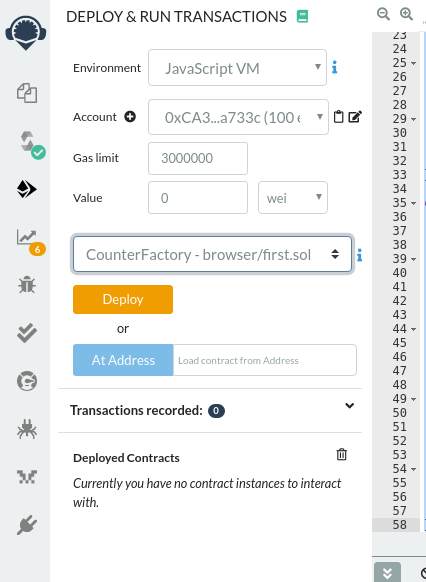
त्यानंतर तुम्ही तुमच्या कॉन्ट्रॅक्ट फॅक्टरीसोबत प्रयोग करू शकता आणि मूल्य बदलत असल्याचे तपासू शकता. जर तुम्हाला वेगळ्या पत्त्यावरून स्मार्ट कॉन्ट्रॅक्ट कॉल करायचे असेल तर तुम्हाला Remix च्या खाते (Account) निवडीमध्ये पत्ता बदलावा लागेल.